Tuesday, March 10, 2015

Everything You Ever Wanted to Know About Projectors


But Were Afraid to Ask

So the big event is tomorrow and you just find out your client neglected to mention they need an LCD projector to display there PowerPoint slide shows. You think, "this should not be that hard." You call a few local AV companies and are bombarded with questions by the AV rep who appears to be talking in tongues; From Lumens, Resolutions, Aspect Ratios to Throw Distance and Front or Rear Projection. Now that this AV guy has you feeling less than intelligent you try not to sound too defensive and say, "just bring me a regular projector." When the "regular" projector arrives and your client arrives also, with his Mac laptop you discover the Mac needs an adapter and the PowerPoint has high definition videos that look horrible through the "regular" projector. If this world is still a bit of a mystery let's venture into the ins and outs of projectors.

Lumens: The Fancy, Glorified Word for Brightness

Note: Movie theaters, while almost completely dark, use between 15,000 and 30,000 Lumen projectors.
One of the most important aspects of a projector is its brightness. The brightness of a projector is determined by the amount of Lumens the projector's lamp produces. Simply put, the higher the amount of Lumens the brighter the projector. Early on In the AV rental business I was taught when buying projectors buy the highest Lumen projectors, or brightest you can afford. In other words, you can always substitute a lower Lumen projector with a higher Lumen projector but not the other way around. On the lower end of the spectrum are projectors rated between 1000-2500 Lumens. In a completely dark room or a room totally absent of light, a 1000 Lumen projector may be sufficient. The issue then becomes the amount of light your projector will have to battle to reproduce the image it is being provided from the laptop, DVD Player, camera, etc. The more light introduced into the space between the projector and the projection screen means the more Lumens required to achieve a satisfactory image on screen. The size of the projection screen is not as important as most would be led to believe until you get into screens 12 feet wide and larger. Mid sized projectors are projectors rated between 3500-5000 Lumens. These are satisfactory for the amount of light within a well lit office conference room or hotel meeting room. In most cases you will be dimming the room lights slightly anyway during the actual presentation. Large event projectors are rated between 7500-10,000 Lumen and are used for bright rooms or rooms with windows where sunlight may enter. Large event projectors are also used for bright rooms with larger projection screens, such as 16 feet wide and larger.


High Definition is in Cahoots with Resolutions and Aspect Ratios

High Definition video is technically any video content recorded at a resolution of 1280 x 720 (WXGA) or higher.

Photo is Standard Definition, Low Resolution 600 x 400


Photo is High Definition 2592 x 1768

Common Resolution Table
Format - - Resolution - - - - Aspect Ratio
SVGA - - - - 800 x 600 - - - - 4:3 (Standard Definition)
XGA - - - - - 1024 x 768 - - - 4:3 (Standard Definition)
WXGA - - - - 1280 x 720 - - - 16:9 (High Definition)
WXGA - - - - 1280 x 800 - - - 16:10 (High Definition)
FHD - - - - - 1920 x 1080 - - - 16:9 (Full High Definition)
WUXGA - - - 1920 x 1200 - - - 16:10 (High Definition)

Room, Space and Throw Distances

In the event industry you almost never have enough space. You start your floor-plan mock-up; drop in your tables, chairs, riser and projection screens but almost never account correctly the space between the projector and screen. This is where short throw projectors and front or rear projection come into play. Front projection is placing the projector in front of the projection screen, with the projector visible to attendees and rear projection is placing the projector, hidden behind the screen. Rear projection gives the most professional and clean look between the two but is not always possible, due to lack of space. For this reason I recommend, when ordering your AV, request a projector with a short throw lens. A lens's throw distance is measured by a throw distance ratio. In this case the lower the number the shorter the throw. Projectors with interchangeable lenses come standard with a lens about 1.65:1 but can accept lenses with a throw ratio as low as .8:1 (varies by zoom and manufacturer).

For example, using a 10ft wide screen, a lens with a 1.65:1 throw ratio will require 16 feet of space between the projector and screen. On the other hand, a projector using a .8:1 lens only needs 8 feet between it and the 10ft wide screen.There are also ultra short throw projectors. While these projectors can achieve a throw ratio of as low as .48:1 they often do not have a zoom feature and do not offer interchangeable lenses.

Tip for Connecting Projectors and Laptops

When connecting a laptop to an LCD projector for an event, movie night or any occasion, for best results and to avoid any failure in communication between the two devices follow these simple rules.
  1. Always power up the projector first.
  2. Connect all cables before powering up the laptop.
  3. Laptop should be off, not sleep.
  4. 90% of the time, as the laptop boots up it will automatically connect to the projector.
  5. When presentation has ended power off the projector but let the internal fan run about 5 minutes before unplugging, to cool the lamp.

If you enjoyed the post, please leave a comment and let me know!


Bruce Johnson
A.V. Rental Services, Inc.
4039 Comly Street
Philadelphia, PA 19135
PH: 800-695-5943
FX: 215-904-8503

bruce@AudioVisualRenting

Thursday, January 15, 2015

Quick Tips for Podium Microphones

Once you have overcome the fear of public speaking...if you ever really do; Then you worry about projecting your voice, annunciation and content. 

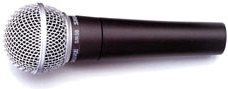
live professional microphone
 
If your AV vendor is 'worth his salt,' you should not have to worry about the microphone quality as well. 

Microphone Choices:
If  a sound (no pun intended), decision is made here you could avoid a number of pitfalls during the event. A 'no-brainer' microphone selection for a podium is the industry standard, Shure SM58. We use the SM58 everyday and on almost every job. 

Pro: The SM58 will allow you to crank the volume before feeding back. (Good for presenters who do not project.)


We do however try to stay away from the SM58 when it comes to podiums because of the con...
Con:  When a presenter turns their head, looks down or moves off slightly to the left or right of the podium, the SM58 will not pick up their voice well, due to the limitations and range of the pickup pattern.

Our 1st choice in podium microphones is the Shure MX Series, with heavy windscreen. The MX Series comes with a 12" or 18" goose neck and your choice of omnidirectional, cardioid and super cardioid cartridges. 
cardioid pickup patternomni directional patternsuper cardioid pickup pattern


Pro: These microphones are ideal as podium mics due to there sensitivity. Your presenter can stand to the side of the podium and still be heard.
Con: Sometimes the presenter may want to remove the microphone from the podium and walk around; can't do it.


User Training:
After selecting the microphone you need to know about placement and how to use it properly. When using the Shure MX Series podium microphones your presenters should speak, keeping about 6 inches from the microphone element. 
podium mic
 Always use the appropriate windscreen, to avoid the popping 'P's". Human beings expel air when annuciating certain letters. This air will be heard as a loud 'Pop' from the microphone. The goal is to not let the microphone catch any air from the mouth. To that end, be sure not to push the windscreen all the way down; touching the mic head. This will leave yet a little more air between one's mouth and the mic.
  

Whether using the MX Series or an SM58, mic placement is key. Keeping the mic below the height of the presenter's mouth or to their left or right side will also help eliminate unwanted breath and air from being amplified.

Bruce Johnson 
A. V. Rental Services, inc.
Philadelphia, PA 19135
www.AudioVisualRenting.com
bruce@AudioVisualRenting.com

Thursday, December 11, 2014

Last Minute Event for the Wilt "The Stilt" Chamberlain Postage Stamp

Dedication Ceremony for the Wilt Chamberlain Postage Stamp

Late Afternoon Call, the day before had us working for USPS

www.audiovisualrenting.com
We had the pleasure of working with the US Postal Service yesterday, in Philadelphia at Overbrook High School.  

Wilt Chamberlain's alma mater, Overbrook High was the venue for the dedication ceremony for the new Wilt "The Stilt" Chamberlain postage stamp. In addition, the over sized stamp was unveiled in the minimally occupied school auditorium. (Probably should have let the students attend). There was a large number of press on hand, as well (I wonder why they did not order a mult-box?)


Wilt Chamberlain's sister was among a host of celebrities, school officials and athletes that spoke during the almost 2 hour event. A local celebrity, Sonny Hill, founder of the Philadelphia Sonny Hill basketball league gave a motivational speech that could very well have been recorded and played to students all over the world. His Philadelphia basketball league was founded in 1968 as a safe haven from gang warfare and other violence. 
audio rentalLarger Image


Famous NBA basketball player, World B. Free spoke of his first time meeting Wilt Chamberlain and the effect Wilt had on his own life. In short, not making basketball your only strength and preparing yourself for when your basketball playing days cease.

World B Free Larger Image


Thank you Post Office for letting us be a part.

Bruce Johnson
800-695-5943


Wednesday, February 5, 2014

NY Comic Con DJ Reel


This is our latest video!
The video highlights the Disc Jockeys that spun at our 2013 New York Comic Con booth.

Includes footage of Grandmaster Caz, Hot 97s "Big Spanish" DJ Enuff, DJ EA ONE, DJ Monster, DJ Get Live, DJ IGNISHUN, DJ Schott Free — at Jacob K Javits Convention Center.

Saturday, December 28, 2013

2013 New York Comic Con - Start to Finish


2013 New York Comic Con - Behind-The-Scenes Video

NYCC Video of Oct. 8-11 2013:

2013 New York Comic Con - Start to Finish
Booth before set up

Booth Up-And-Running
I met Tramp Daly through a childhood friend Quanzilla (A.Waymaker, Saddler Ward) Tilman. Tramp and Quan are both expert artist with strong hip hop influences. It is the summer of 2013 and Tramp has a dream and a partial vision for exposing Sureshot, his company, at a booth inside 2013 NY Comic Con. Sureshot is a hip hop inspired company producing art pieces, graphic novels and television cartoons; all hip hop influenced. Based on my audio visual experience and owning A. V. Rental Services, Inc., my Philadelphia based audio visual equipment rental company, Tramp enlisted me for scheduling, booking, planning, assistance in booth design, AV, Stage and Lighting equipment rental and equipment set up & breakdown.
Quanzilla w/ Inspector Gadget

From the start it was made clear, the scope of my work was everything non creative. This was to be the case right up until day 1 of set up. Up front it was a good feeling to be solely responsible of the entire logistical planning of the 2013 New York Comic Con booth. When it comes to Comic Con planning and booth rental experience however, I had none. My first order of business was contacting the Comic Con Organization and becoming acclimated with doing business as well as working within the Jacob Javits Center. 
The event budget was never revealed to me. I thought it would be necessary, at the least helpful to have this information. In retrospect, it would only have been important if the budget was unrealistic, which it obviously was not because there was little quibbling over pricing. A welcomed change in my line of work. Bear in mind the invoice was HEAVILY discounted based on my personal vested interest and friendships involved. In addition, I planned to throw in extra equipment and my personal on-site tech services, at no extra charge.


Tramp, DMC & Bruce Johnson
The New York Comic Con, if not all of the Comic Cons, is ran by the ReedPop Supply Company. In reference to my email correspondence with ReedPop, email responses from ReedPop staff was horribly slow and obtaining Comic Con booth, floor maps proved to be challenging. Tramp and The Sureshot Company pockets were deep enough to secure an ample sized corner, peninsula booth; which was unexpected and indeed impressive. Unexpected because Sureshot's primary focus was showing and bringing awareness to the hip hop inspired artwork and television shows, which alternatively positioned selling Sureshot merchandise as the secondary focus.

Creating a scratch design drawing of our awesome booth was the next item on the menu. This included determining how and where we would highlight Tramps artwork, which equipment we would use to draw attention to our booth, and which back line equipment we would use for the rotating disc jockeys. In detail this included L.E.D. lighting, pipe and drape, lighting truss, two 60 inch television, sound system, turntables, microphones and a stage. I mocked up a CAD drawing for visualizing our booth and to help with any wanted changes of adding or taking away equipment.

Our numerous design meetings resulted in decisions on artwork placement and adding couches, carpet, tables, bookshelves and merchandise cabinets to our booth vision. This highlighted my next duty which was securing a furniture rental company. The merchandise cabinet was a must but furniture rental would take us over budget due to the added union labor charge we would incur after the furniture reached the Javits loading dock.
The carpet was later cut for the same reason, in addition to even higher charges to have the carpet installed within the booth. In the end we brought our own inflatable couch, area rug and custom Sureshot logo, vinyl floor covering.
With a soft booth design complete it was time to attack union scheduling. This meant determining which unions we required (Shipping and Receiving, Carpenters, Electricians, etc.) and estimating the hours needed for the union to build our booth. We teetered with the idea of having an analog telephone (for credit card transactions) and/or hard wired internet at the booth. Both were subsequently nixed based on budget. 
The first union to tap our wallets would be the labor department. Their overpaid duties would be unloading our van. I was mentally preparing my verbal delivery, to Tramp, of inflated quotes for union labor we were sure to receive. Little did I know Tramp obviously heard similar rumors and was expecting high numbers from the unions. However, in addition to rumors, Tramp also heard stories of being able to sneak/load equipment in the front door, bypassing the union shipping and receiving charges. This is where Tramp and I had our first disagreement. Minor in retrospect, but a disagreement all the same. Tramp wanted to sneak all of our equipment in the front door. Lighting truss, 60 inch television cases and all. My concern was angering the union and ruining a relationship with the Javits center I was developing since starting the booth planning. When I possibly return to the Javits center for future rental jobs, I want to return to smiles and a pleasant atmosphere. Moreover, my company had to increase our insurance to satisfy the Javits center's insurance requirements. This added insurance cost has to stay on our policy for 1 year. I would like to have more than 1 invoice carrying this insurance increase. Finally we decided to play it by ear, using the union for big equipment cases and loading in smaller items through the front door. I must say Tramp was correct, we probably could have loaded everything in through the front door. I say this is the case because at the end of Comic Con we loaded everything 'out' through the front door. Having so said, we pissed the union off in doing so.


At this point in my life I had only heard rumors from non-union companies, of the nightmare of dealing with the unions in New York. The preconceived notion of future headaches were looming in the back of my mind. During the planning, my casual thoughts were full of vsions of union reps yelling at my guys for connecting a microphone or my workers being reprimanded for carrying a box. 
As October neared, my anxiety increased, which is normal for me with jobs of this size and larger. The same holds true for all jobs in which I have a personal vested interest, large or small. The equipment we would deliver from our Philadelphia location was finally written in stone. The equipment list/invoice ended up including some unorthodox items such as bookshelves (to be assembled on site) tables and custom artwork support clamps, designed by me. Most new items were never added to the invoice; they were thrown in at no extra charge.


Javit's Center Receiving
Alright so all the planning is in order and the time is HERE. It is 8am of October 8, 2013 and time to drive to New York and initiate booth assembly. There is no time for procrastinating and no time for altering the ultimate plan; only time to implement everything we strategize for the past 3 months. Thomas TJ Curry, one of my guys drives our van up the turnpike, northward; Philly to Manhattan. I follow close behind, anxious and eager to complete load in…anxious and eager to meet these union guys. I sent one guy from my staff based on the understanding everyone would be joining in for set up and breakdown. Teamwork makes the dreamwork! We are Family…like Sister Sledge said, right. Well folks, have no fear, it was that way. Thank goodness because my guys work for a living and TJ has no investment in what I have been doing for the past 3-4 months and nor do I require this of him. Anyway, we arrive at the Jacob Javits Center and I schedule a time with Freeman Labor to unload the van in the loading dock off 12th Ave. In the meantime Tramp and Quan are doing everything they can to start unloading through the front door on 11th Ave. We grind and hustle and manage to unload all of our equipment through the front door, except for the truss and large screen TV's. Freeman called once to let us know we were to approach the dock and unload. I told them my guys had a flat tire and would enter the dock when the van was operational; that is if we did not just change our minds and go home…a total lie. The second time they called we only had the truss, stage and TV's left in the van and we agreed to throw the union a bone and let them unload the remainder. Honestly, I feel we could have unloaded every damn thing through the front door but the dock appointment was scheduled with Freeman loading and I have a thing about honor. 
All of our equipment, at this time is in the building and we are prepared to commence setting up the booth. We are approached by the union numerous times during the set up process to be reminded of our  limitations in performing our own labor. I must say, while we were able to slip by the union bringing in equipment, performing manual labor of any seriousness (operating power tools, hanging TV's, climbing up and down trussing , etc.) was not going to happen. Often my anxiety is my driving force; wanting to be in the end zone pushes me to work fast most of the time. With that being said, the majority of our audio visual equipment was set up by the end of day, October 8th. Much to my surprise, we were even able to stand up the truss goal post. The remainder of the equipment; TV's hanging on truss, speakers hanging on truss an large banner sitting on top of the truss, we were being forced to hire the union to set up and hang; so my hands were tied. I clocked out around 8pm.

The next morning I arrived to the TV's and speakers hung in their perfect position. The only thing left was hanging the humongous 'Badlands Movie' banner on top of the trussing. Guess why the banner was not set up…because the TV's and speakers were hung by the electricians and the banner had to be set up by Carpenters. Yes the vinyl banner, aluminum pipe and velour drape had to be set up by the masters of woodworking.
Now it all makes sense doesn't it?
I had to schedule an appointment with the Carpenters union to have this done. It was a speedy process thank goodness and they had the banner set up less than 3 hours later. I spent the entire day at the booth, setting up alone and hit 95 South about 5pm when all AV equipment was set and I could not find anything else I could do on my own. It was a load off my back having all of the AV equipment set up.
Day 1: October 10, 2013, of 2013 New York Comic Con is here and we are ready. With all of my AV duties completed and Comic Con doors opening at 3pm, I expected to slide in to town at my leisure...Oh I don't know, 1, 2, 3 O'Clock. Not a chance, my phone was ringing at 10am! No problem, fuck breakfast…my favorite meal of the day. New York here I come. I sure wish Tramp and I established a schedule during those August meetings. Then we would have known ahead of time, who would man the Comic Con booth each day and for how long. Take a note for next year.
Oose
With our second argument recorded in the history books, Day 1 started slightly rocky but it was surely sweet…not smooth, sweet sailing from there on. I say not smooth because this was our 1st Comic Con booth and hiccups and speed bumps were to be expected. One of the Day 1 speed bumps were a shortage of Comic Con badges for our guest DJ's to enter. Comic Con uses an efficient tracking system and is very strict about only allowing 1 person per badge. While I unsuccessfully tried to finesse and flirt with the ladies at the entrance to get our DJ's in; all hail the king Oose who bum rushed his way through the gates each day. Each day we had different DJ's and special guest appearing at our booth. On October 10th, Con Day One, Hot97 Radio DJ, DJ Enuff appeared and spun music for hours. We drew large crowds, Con goers danced in the aisles and DJ Enuff socialized with the audience. DJ Ignishun also spun and had the Cosplay crowd sweating in their costumes.
Day 2 - Day 4: NEXT BLOG - STAY TUNED

Thursday, September 5, 2013

A Free 'WOW' Factor Idea


"Wow" Factor Idea For Events


Oh the never ending quest for incorporating the WOW factor in your event!

This idea we explain here, we will call the Truss Spandex Splat. 
While it may appear difficult and/or expensive, it is not difficult to erect and should cost between $750 to $1500 to rent depending on the light types and quantities. 
par, par light, parnel, fastfold

Additionally, in this blog I will mention some vendors, in which you can buy or rent some of the items. All photos in this blog however, are from events in which A.V.Rental Services Inc. were the contracted vendor.
First of all, spandex or Lycra fabric may be used but I do recommend white when used along with lighting. I will explain how to build a system with 1 piece of fabric. For bigger events you can add more fabric, truss sticks and lighting.

We mostly use Tomcat 12" x 12" truss, 10ft long but 20" truss may be used as well. Two 10ft truss sticks must be bolted to a large truss base with 4 bolts, then stood upright making what we call simple truss towers. The fabric will be connected to the sides of each truss stick. 
If using lighting mounted directly to the truss connect the fabric to the back side pipe of the truss to allow room for light fixtures to be mounted to the front side. To connect the fabric to the truss you can buy fabrics from Rose Brand, located in NJ, CA and Canada; with built in fabric loops. Alternatively, you can tie good knots at each fabric and use zip ties to truss connection. There are splats with as little as 3 points and splats with 6 or more points. You will need a third stick of truss when using 6 point splats.
 
The third truss stick will go overhead; bolted to the two upright truss stick towers by way of truss corners; making what we call truss goalpost. (See Pic) =>
The 2 upright truss should be spaced apart far enough to stretch the fabric taut, eliminating all wrinkles. If you are building a truss goalpost your fabric must stretch to, and become taut at the width of the top truss stick. That is to say, if the top truss stick is 10 feet long then your fabric should reach maximum tightness and lose all wrinkles at 10 feet.

Once the truss and fabric portion is built you can add your lighting. You can use pars to shine a color on the fabric. We primarily use L.E.D. lighting due to all the available colors, the low electricity draw compared to conventional pars and L.E.D. pars have the ability to change automatically and fade between colors when set on auto. 

As I mentioned above, you can mount lighting directly on the truss with 'C' clamps or cheese borough clamps. (See Pic Above)

rentmyplasma Another light option is a gobo design with a Leko (ellipsoidal spotlight). This light system projects a gobo design, wedding party names or logo onto the fabric surface. This is a great personalization selling point for weddings.

Gobos can be purchased through A.V. Rental Services, Inc. but please allow at least a week for the manufacturer to custom build. Complete Leko & Gobo light systems can also be rented from A.V.Rental Services, Inc.


Tips:
1. For a slightly different look you can use white fabric truss covers. 
2. In addition you can put small par lights inside the truss (truss warmers) to color the truss cover fabric.
3. When buying fabrics, Rose Brand has multitude of fabrics, some with colored trim to keep with any event color schemes.
Send me your pics and let me know how you 'Wowed' your audience!


Bruce Johnson
A.V. Rental Services, Inc.
4039 Comly Street
Philadelphia, PA 19135
PH: 800-695-5943
FX: 215-904-8503
bruce@RentMyPlasma.com

www.RentMyPlasma.com

http://www.audiovisualrenting.com/images/logo_image.jpg