Showing posts with label av advice. Show all posts

Sunday, July 8, 2018

Video Walls, Who Needs Them?


Video Walls, Who Needs Them?

video wall, videowall, hd video, hd videowall, 3x3 videowall, rentmyplasma, bigbruce, big screen tv


We recently started stocking high definition video walls. We are using Planar, professional, commercial TV displays for all configurations up to 3 x 3. 3 x 3 is 3 displays down and 3 displays across.

When friends of mine heard of our new video item they immediately thought, “wow we can watch the Eagles games.“ 

…Or they think, “we should have a fight party.” ...Not exactly why we decided to bring video walls in-house.

 My first thought was “Ooh, we can watch Game of Thrones.” Coincidentally, not the reason either.
What ever the case, my business mind eventually ran through appropriate uses for such a professional video product. The applications at ‘top of mind’ are conferences, trade shows and digital signage for varied industries. Medical, Education, Government and Technology, leading the charge and private events landing way at the bottom of the list.
In reality, a video wall has a place at ANY convention. As you may have noticed if you have attended any convention in the last 5 years or so. They are often placed at or near entrances providing convention information, welcome videos or venue maps. They can also be found at booths, large and small, displaying specific product information, images or promotional videos.
I often attend audio visual conventions, in the AV world they are used commonly to run product videos, run promotional videos, Instant Magnification of Live Video (IMAG) and/or demonstrate and exhibit video quality of auxiliary video equipment.
videowall, video wall, hd video, hd videowall, hd videowalls 
In the end, regardless of how a video wall is utilized, it brings with it a ‘WoW’ Factor that cannot be substituted.

Our most common configuration has been the 3 x 3 grid, using nine HD TV Displays. Nine Displays with uniform bezels for the smallest grid between and largest viewing image. Additionally, we stock a mobile cart that moves easily with locking casters.
http://www.audiovisualrenting.com/gear/videowall-rentals/
For more information contact Bruce Johnson with A.V.Rental Services, Inc.
PH: 800-695-5943

Wednesday, January 31, 2018

Sound Advice: How Many LoudSpeakers Should I Use?
sound system, brooklyn brewery

Sound Advice for Best Conference Audio!

Sound Advice, Polite behavior is normally best practices. What polite behavior may not get you however, is a great seat at the conference.

When it comes to sound advice, many of the questions and rental RFQs we see are for 1 to 2 loudspeakers. I almost never see an event planner requesting a four speaker sound system. Many times people believe one speaker will be sufficient. In the other instances people believe two speakers is the most you could ever need in any given situation. Early on in my A/V equipment rental career I was advised to use surround sound systems. This meant, put a speaker in every corner. This was applied in order to achieve full coverage.
We now operate under the premise that single speaker rental request are basically rental suggestions  demanding our professional experience and recommendation.
Unless a client is blatantly demanding a single speaker set up I will never supply an estimate for a single speaker rental. Having so said, I will always recommend a four speaker sound system for groups of 50 or more.

Sound Advice: 50 is the cut off?

In my experience, that is where side conversations start to have a devastating effect.
Side conversations are what happens when some conference attendees are engaged wholeheartedly and some attendees are less than engaged.
What happens in this situation, is the attendees that are less than engaged will start to have a side conversation discussing anything but what is relevant to the conference. The engaged conference attendees, being polite, will not say anything, will completely be distracted and completely miss out on what could be valuable information pertinent to their careers, education or personal life. The engaged attendees would like to hear what the presenter is saying but the nearest loudspeaker is too far away to penetrate the side conversation occurring at their table.
This situation is dire to the overall conference experience of each and every attendee. This is important because as an event planner or conference organizer, your attendee feedback will be mixed.

Your conference reviews may include negative comments, impacting the conference’s future attendance.

For this reason I have developed a chart to assist in deciding the appropriate sized Sound system for speech and music applications.

– Factors that should also be considered; exterior applications, concert level sound, extremely high ceilings and extremely large ballrooms.


sound, audio, system, size, chart, guide
Sound Advice Guide
concert, outdoor, sound, audio, system, size, chart, guide
Please use tables as a guide and not in place of consulting your AV professional for advice. Comparable powered speakers can be used in place of passive speaker sound systems in the above tables.
This last tip is written in jest but can still be somewhat useful. In an attempt to make the guidelines scale-able, I present a very casual rule and I use the word ‘rule’ very loosely. If your events are larger than the above guidelines reference, then for every additional 100 people add 4 more speakers and about a 750-1000 watt amplifier or better yet call or email me for more advice. bruce@RentAVHere.com

Thursday, January 15, 2015

Quick Tips for Podium Microphones

Once you have overcome the fear of public speaking...if you ever really do; Then you worry about projecting your voice, annunciation and content. 

live professional microphone
 
If your AV vendor is 'worth his salt,' you should not have to worry about the microphone quality as well. 

Microphone Choices:
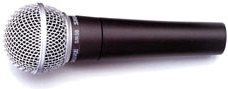
If  a sound (no pun intended), decision is made here you could avoid a number of pitfalls during the event. A 'no-brainer' microphone selection for a podium is the industry standard, Shure SM58. We use the SM58 everyday and on almost every job. 

Pro: The SM58 will allow you to crank the volume before feeding back. (Good for presenters who do not project.)


We do however try to stay away from the SM58 when it comes to podiums because of the con...
Con:  When a presenter turns their head, looks down or moves off slightly to the left or right of the podium, the SM58 will not pick up their voice well, due to the limitations and range of the pickup pattern.

Our 1st choice in podium microphones is the Shure MX Series, with heavy windscreen. The MX Series comes with a 12" or 18" goose neck and your choice of omnidirectional, cardioid and super cardioid cartridges. 
cardioid pickup patternomni directional patternsuper cardioid pickup pattern


Pro: These microphones are ideal as podium mics due to there sensitivity. Your presenter can stand to the side of the podium and still be heard.
Con: Sometimes the presenter may want to remove the microphone from the podium and walk around; can't do it.


User Training:
After selecting the microphone you need to know about placement and how to use it properly. When using the Shure MX Series podium microphones your presenters should speak, keeping about 6 inches from the microphone element. 
podium mic
 Always use the appropriate windscreen, to avoid the popping 'P's". Human beings expel air when annuciating certain letters. This air will be heard as a loud 'Pop' from the microphone. The goal is to not let the microphone catch any air from the mouth. To that end, be sure not to push the windscreen all the way down; touching the mic head. This will leave yet a little more air between one's mouth and the mic.
  

Whether using the MX Series or an SM58, mic placement is key. Keeping the mic below the height of the presenter's mouth or to their left or right side will also help eliminate unwanted breath and air from being amplified.

Bruce Johnson 
A. V. Rental Services, inc.
Philadelphia, PA 19135
www.AudioVisualRenting.com
bruce@AudioVisualRenting.com

Tuesday, July 9, 2013

Event Planning & Stage Design Advice

Wednesday, January 26, 2011

Advice on Stage Design


As our company grows we are finding more and more clients, not only need to rent audio visual equipment, lighting and staging but also need assistance in the planning phase of their events. The knowledge we gain, performing and teching on a daily basis, as audio visual technicians, is invaluable to a client who may only plan 1 to 2 events per year.
The ideas we have in our heads have been attained just by being present and observant during the shows we work day-to-day. I implore event planners, wedding planners, trade show organizers and the like, to pick the brains of your AV suppliers. Oftentimes, the AV sales rep may not even know the knowledge they possess.

Here are some improvement tips and ideas for your room, stage and overall event:


1. Lighting - An easy, valuable addition to your event is the simple inclusion of a few parnel (par) lights, strategically placed on stage.
First of all, I highly recommend moving to L.E.D. lighting over traditional lighting.
Why?...L.E.D. Lighting is green.
( eg. Traditional Pars can consume up to 90 Watts, while L.E.D. Pars consume approx. 7-10 Watts of electricity )
Additionally, L.E.D. lighting offers a multitude of color options and color mixing, without the use of gels. Adding lighting to your stage is an attention getter; be it basic up lighting or lighting mounted on truss. It provides the necessary 'wow' factor to your show and adds some eye pleasing color for the audience, photographers and videographers.
See Pic (L.E.D. Pars used along with draping): http://www.audiovisualrenting.com/gallery/index.php?gallery=./Marathon%20Lights&image=Pink%20Stage.jpg
Going one step further can be including intelligent / moving head lighting. L.E.D. Moving Head lights are great for the same reasons stated above; however, the price difference between L.E.D. and traditional moving head lights does not yet warrant blindly going with L.E.D. What you need to know if you plan to use intelligent lighting is...in order to get the full benefit, you will need a dedicated lighting engineer to set up and run the fixtures properly and efficiently.
Lastly, a major concern when using lighting is the available electricity in your event room. You should, when possible, consult the building engineer or put your AV and Lighting supplier in touch with the building engineer to ensure there are not any circuit breakers tripped or power outages during your show.

2. Trussing - Trussing is primarily used for mounting of lights, video screens (we will discuss later), speakers and adding fabric effects for lighting. The same lights discussed above can be alternately be mounted to truss towers. When deciding to use truss, or not, you must be aware of your available stage space and truss weight limitations. This is where you make your AV supplier earn his or her salary. With your supplier, you should be able to verbally explain your vision and have them execute the same vision, to your satisfaction.
For visual stage effects, using trussing and a few pieces of Spandex or Lycra fabric you can create a beautiful and professional looking stage
to serve as a dramatic backdrop during your show. When using truss for this stage effect be sure to use bases and/or enough trussing to ensure its sturdiness. the last thing you want is your trussing toppling over before or during your show.
See Pic (truss with fabric):
http://www.audiovisualrenting.com/gallery/index.php?gallery=./BAE%20at%20Sheraton&image=IMG_1483.jpg
See Pic (extravagant truss set up with crane and hoist)
Comment - I really like working with trussing because in the long run it clears the stage by allowing us to truss mount almost anything.

3. Video - For the purposes of this blog, I have one idea and one word to add the 'wow' factor to your event; it is 'I-Mag'.
I-Magging is the act of shooting and broadcasting live video, simultaneously.
What Do I Need: You will need a video camera, LCD or DLP projector and projection screen.
What Do I Do: With the video camera, you will shoot the presenter, send the video output
to the LCD projector and project it on a projection screen,
most commonly placed behind the presenter. You can alternately route the video output to a plasma or LCD monitor(s). If you are using trussing you can easily mount a Da-Lite Fastfold screen to the trussing. If stage space is a concern, I recommend using a short throw projector to conserve. Lastly, be sure to use a projector with sufficient Lumens to not be effected or dulled by the nearby lighting.
See Pic ( Necessary Imag Rental Equipment):http://www.audiovisualrenting.com/events.html


If you are in the Philadelphia, New Jersey, Delaware area we would be ecstatic to quote and possibly be involved in your next event!

Bruce Johnson
A.V. Rental Services, Inc.
4039 Comly Street
Philadelphia, PA 19135
http://www.rentmyplasma.com/